How do I invite my clients to Zoho Social?

Please note that client invitation is exclusive to the Agency Edition. Learn more here.
We recommend that you rebrand your portal before you invite clients.
You can invite client members to your brand or portal with restricted permissions without having to create a separate role under Roles & Permissions.
You can invite client members to your brand or portal with restricted permissions without having to create a separate role under Roles & Permissions.
As a Brand Admin:
You can invite your clients to the brand you manage from Setings.
Select Brand Members, then click Invite.
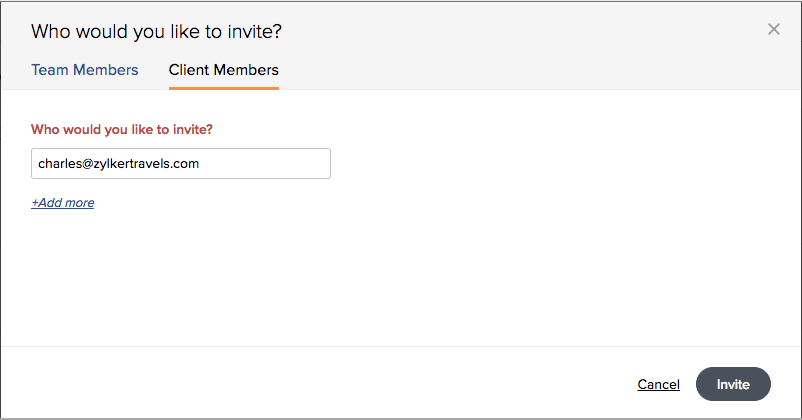
Select Client Members and click Invite.
Select Brand Members, then click Invite.
Select Client Members and click Invite.
Enter the client's email address and click Invite.
Click Add More to send invites to more than one client at a time.
If you'd like to see how your client dashboard looks like, you'll need to send the invite to a secondary email address that isn't a part of the portal yet. You can't send invites to an email address that's been already invited to the portal or is already a part of the portal.
As a Portal Admin:
You can invite a client either to specific brands or to all brands in your portal from Setings.
Select Brand Members, then All Members.
Select Client Members and click Invite.
Select Brand Members, then All Members.
Select Client Members and click Invite.
Select the brands you'd like to invite this client to and click Invite.
You can also invite clients the same way as a Brand Admin would do for the specific brands.
You can also invite clients the same way as a Brand Admin would do for the specific brands.
Related Articles
How do I invite my clients to my Brand on Zoho Social?
Follow these steps to invite clients to your portal: 1. Click Brand Members & Roles under Settings. 2. Go to the Client Members tab and click the Invite button. 3. Enter the client's email address and click Invite. If you want to invite more than one ...Brands and Portals
What is a Portal? In Zoho Social, a Portal houses all your Brands. You can connect and manage your pages and profiles to different Brands on Zoho Social. When you first sign up for Zoho Social, a Portal is automatically created for you. To change ...As an Agency, can I customise my portal with my company logo before I invite my clients?
Please note that the customization features are exclusive to the Agency Edition. Learn more here. You can customise your portal with a company logo, favicon, and a custom domain before you invite your clients. Also, customise any report sent out via ...Can I share an entire section from a Network Report with my clients?
Yes, these are the different ways you can share whole Network Report sections with your clients: By adding them to Zoho Social: Simply add the client to Zoho Social with a client role so they can access the report sections. Email: - On a Network ...How do I set up a custom domain in Zoho Social?
Your clients can view their dashboard from the default domain we have provided: yourcompanyname.social-public.com or from your custom domain. Go to Portal Settings and click Customization. Enter your preferred custom domain and click Submit. ...