Where can I see my emails sent to a lead/contact using IMAP?
To view emails sent to a lead or contact using IMAP:
- Go to the Records Details page of the desired lead/contact
- In the Emails section, select the desired IMAP shared user from the pick-list field.
The emails sent via IMAP are displayed.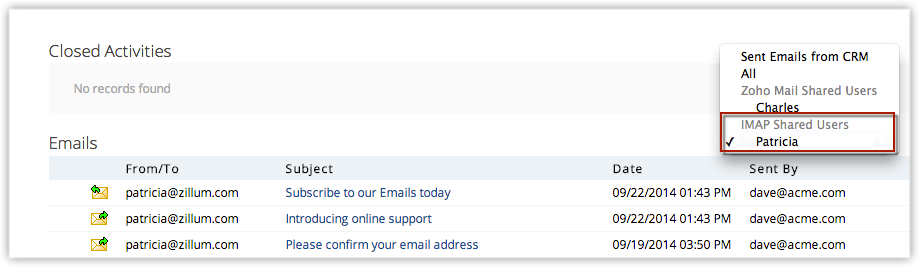
Related Articles
Workflow for Emails
Announcement: We have updated the workflow rule automation for emails with the following enhancements and are opening the same in a phased manner. Inclusion of deals module in the outgoing email trigger Addition of new parameters to the outgoing ...Using the MS Outlook Plug-in (Windows)
We have deprecated download of MS Outlook Plug-in. The Plug-in will not be functional after May 31st, 2021. Read more about it here. Using the Zoho CRM Plug-in for Microsoft Outlook, you can do the following: Add records to Zoho Category Remove ...Emails in Zoho CRM - An Overview
The primary problem with having CRM and a communication channel independent of each other is the lack of sales context. Following are the top three benefits of activating email in Zoho CRM. Contextual view of email conversations with a customer: A ...How do I check previously sent mass emails?
The Sent tab on the mass emails page lists all the previously sent mass emails. Click on an email to see details including who it is from, who it was sent by, the template used, and the sent email statistics. The Sent Email Statistics allow users to ...How do I send mass emails to selected records in the Leads module?
You can send mass emails to selected leads in four different ways: Manual selection Custom view Advanced filter Criteria on the Mass Email page Manual selection: Select records manually from the list of records in a module and then select the Send ...