Import contacts from Zoho Docs

We have recently updated Topics in Zoho Campaigns. Please click here for the updated help document.
Zoho Campaigns lets you import contacts from different cloud storage services. You can import contacts stored in Zoho Docs as contacts in Zoho Campaigns. The file to be imported should meet the following requirements,
- It should be in either Excel or CSV format. Text files are not supported.
- It should have an email address field.
Import Contacts
- From the Navigation toolbar, choose Contacts and then All Contacts.
- Click on Import button.
- Hover over Zoho Docs and click on Import button.
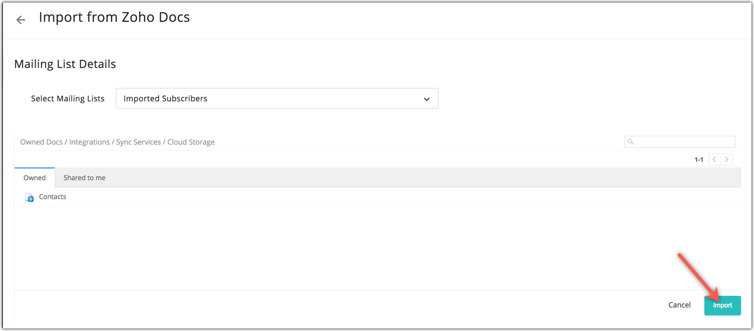
- Choose a mailing list and the file from which you need to import contacts.
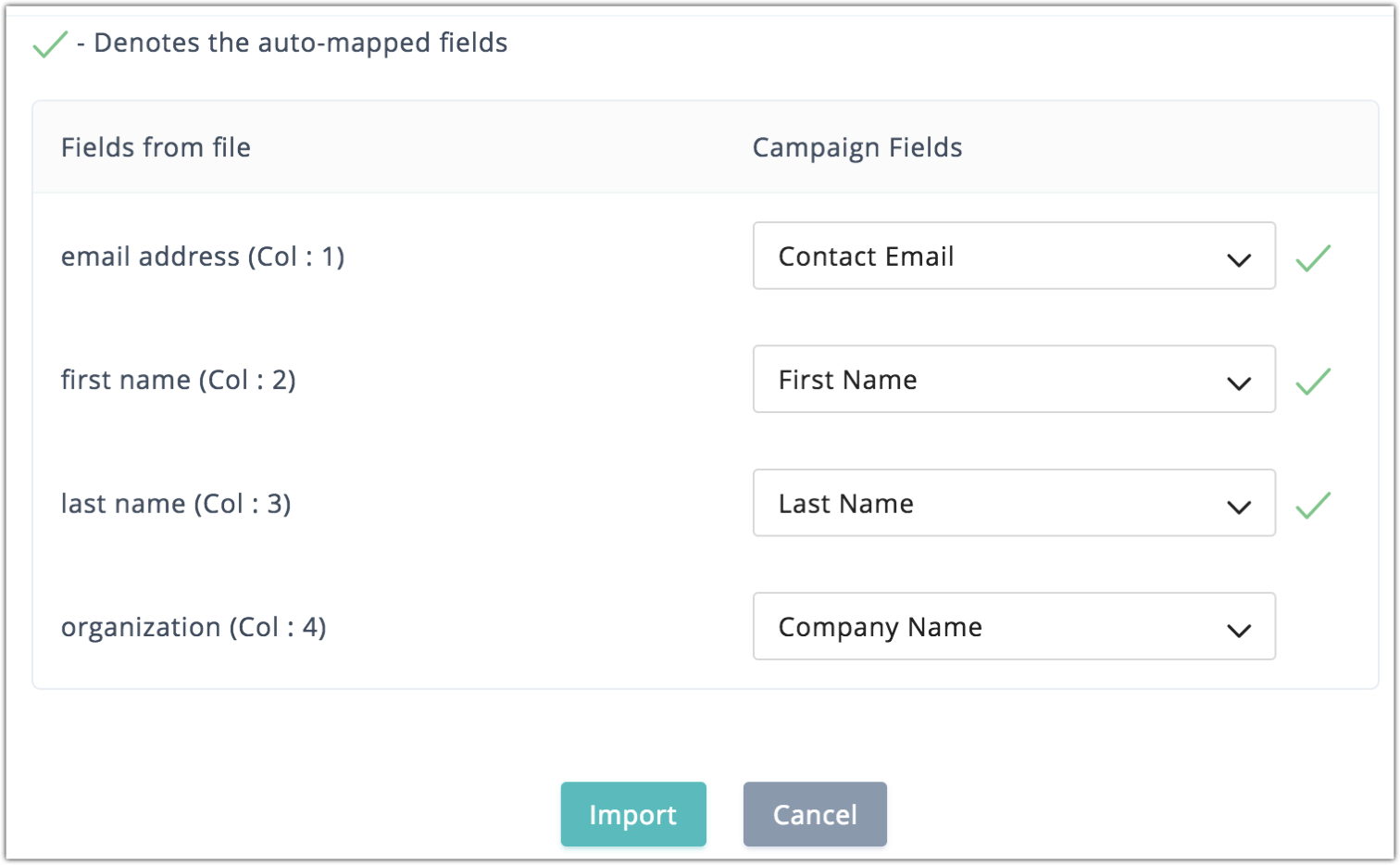
- Fields from file are pre-mapped with Campaign fields. You can change a mapped Campaign field by clicking on the Campaign Fields drop down.
- Click Import.
Import Process
File import process takes place in five steps,
- File read - Selected file is scanned before commencing import.
- Invalid Patterns - Contact detail without an email address or with an invalid email address ( For example, "johndoe.yahoo.com", "julia@gnail.com", "darren@outlookcom") are ignored.
- Unsupported emails - Group email addresses(hr@zylker.com, admin@zylker.com) are ignored.
- File Duplicates - Already imported contacts are ignored to avoid duplication.
- New & Duplicates - New contacts' details are imported into the mailing list.
Import Result
Upon importing the file, Import Result is generated which displays the detailed report of the import. You can view file name, import status and, the number of newly added, re-added, duplicate and ignored contacts. You can click on the Import History link to view previous import details.
Related Articles
How to import contacts from Zoho Docs?
To import contacts from Zoho Docs, From the Navigation toolbar, choose Contacts and then All Contacts. Click Import. Hover over Zoho Docs and click the Import button. Choose a mailing list and the file from which you need to import. Map the fields. ...Import contacts from Zoho Docs - New Version
Zoho Campaigns lets you import contacts from different cloud storage services. You can import contacts stored in Zoho Docs as contacts in Zoho Campaigns. The file to be imported should meet the following requirements, It should be in either Excel or ...Associating a contact with a topic
Topics are used to categorize your contacts according to their preferences, so that you can send them the right emails. You can configure multiple topics according to your requirements using the Topics feature in Zoho Campaigns. After configuring ...Import contacts from Zoho Creator
We have recently updated Topics in Zoho Campaigns. Please click here for the updated help document. Zoho Creator is an online custom apps builder through which you can create different applications using drag & drop feature. Any Zoho Creator will ...Import contacts from Zoho Invoice
We have recently updated Topics in Zoho Campaigns. Please click here for the updated help document. Zoho Campaigns integrates with Zoho Invoice to help you build your mailing lists. You can map custom fields in Zoho Invoice to Zoho Campaigns to ...