How do I know which Zoho CRM Edition I am using?
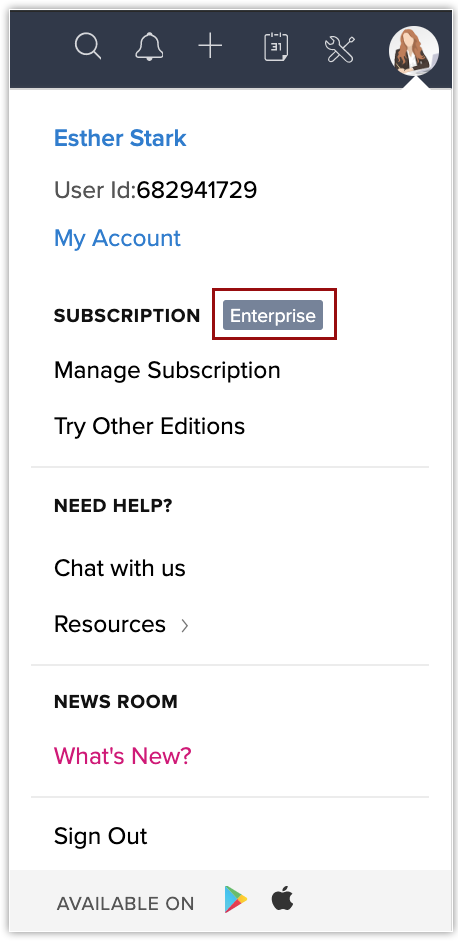
You can find out which Zoho CRM edition you are using by clicking the Profile icon on the top right corner of your window. The edition will be displayed next to Subscription.
Related Articles
If I am using the Enterprise Edition, and I have subscribed for 2 additional users, how many API requests can I make per day?
In Zoho CRM, a single Enterprise Edition user can make a maximum of 25,000 requests per day per organization or 500 users per user license, whichever is lower. The minimum and maximum limits vary according to the edition which the organization is ...Specifications in Zoho CRM
Zoho CRM Editions Zoho CRM is a cloud based application that offers five different editions each comprising of different features focusing on specific business needs. Free Standard Professional Enterprise Ultimate Each edition is priced differently, ...Creating Validation Rules Using Functions
By using function you can create a validation rule where the value entered by the user needs to be verified outside the CRM database. You can even validate the fields like phone numbers, zip code and so on for a particular pattern by mentioning the ...Which edition will the new CRM account be subscribed to?
Zoho CRM allows users to access multiple organizational (CRM) accounts using the same email address. This is especially useful for organizations who maintain different CRM accounts to manage their business, such as a franchisee or a subsidiary. The ...Zoho CRM App Settings For Android
Change Theme To change the color theme In your Zoho CRM app, go to Settings. On the Settings page, under Themes, select the desired colour theme. The chosen theme is applied across the app. Choose Fonts In your Zoho CRM app, go to Settings. On ...